Layout customization/App (mod list) responsiveness
Hi there,
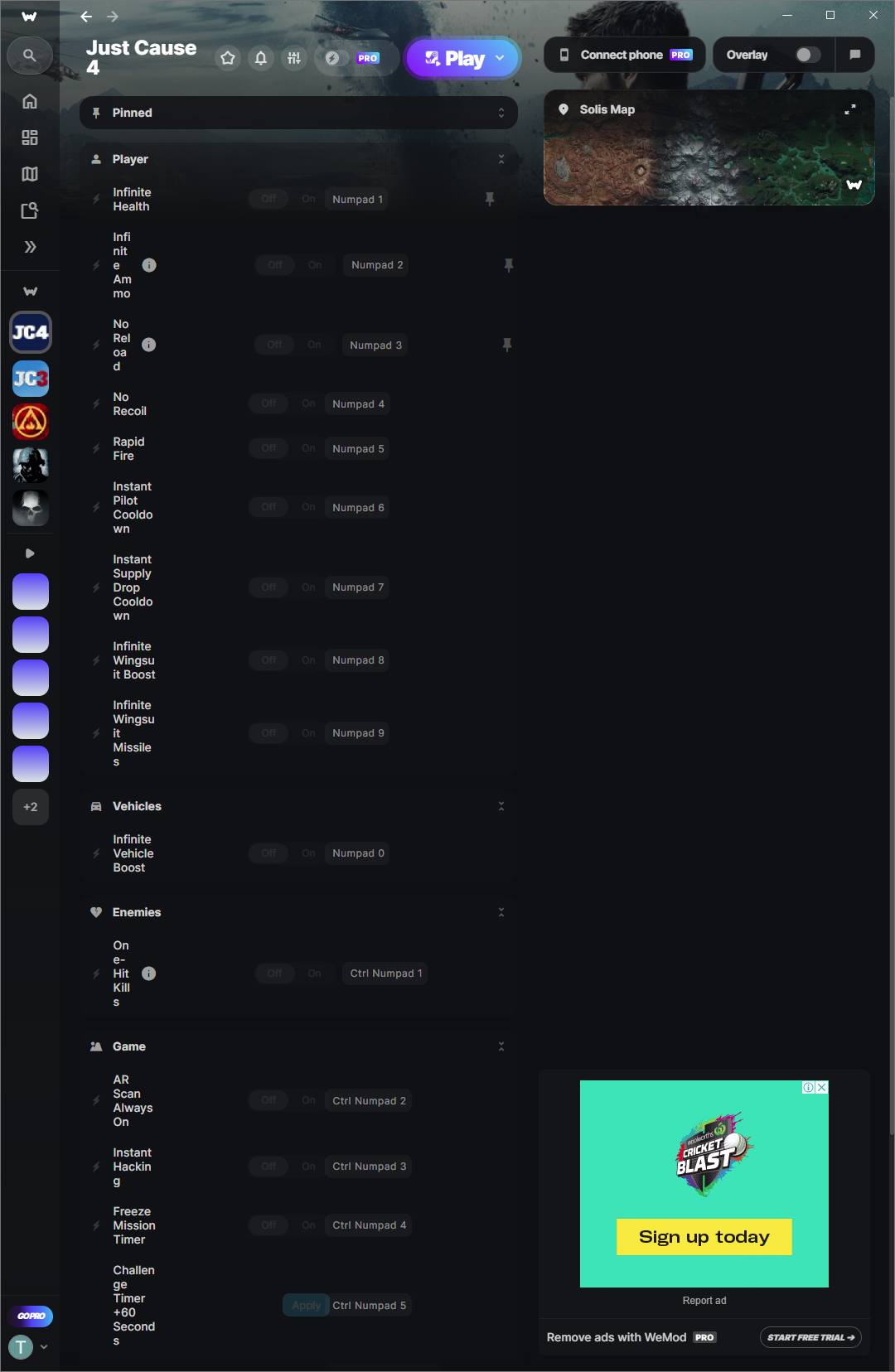
I’m using a dual monitor set-up (horizontal in the middle + vertical on the side). The vertical window has a resolution of 1080×1920. Yet, it is not enough to show the layout of your software. I’m playing Just cause 4 and the “Solis map” is a feature that takes almost have the width. I have attached a screen shot to show the problem. perhaps you can add the possibility to customise the layout or the font size please.
Regards,
Tri
Log in to comment and vote
Comments5
O4OUR
Jun 15
Seems my post was merged into a similar, but not quite the same, post.
Here’s the original for as long as it lasts.
https://hub.wand.com/p/better-vertical-monitor-layout
If that ever goes away, then here is what i’m working with and then a quick little set of mockups after.
Original post:
“Can we have a better Vertical monitor layout? 1st image is the default; the 2nd is a quick edit I did. Literally nobody uses Highlights (and definitely not as much as they do the mods), so their hierarchy needs to be different. Also, a minimize button on the games list would be incredible too.”
excalith
Jan 12
For the same reason as you all mentioned, I have been using in-game overlay instead. But the client-side UX improvement would be nice to have!
I understand the ads should be visible at all times, but maybe depending on the screen width, changing the 2-column layout into one-column would help via making the ads float above the list of cheats as sticky banner (with a proper bottom padding to list for sure)?
Gimli_theone
Nov 10, 2025
would love this as well, but tbh… don’t think this is every gonna happen because they use the space on the right often for ads.
robzero1
Aug 5, 2025
same problem
it also got worse with the last update
richpal
Jul 19, 2025
I have the same problem. Is there a way to shrink the trainer layout so it fits on the whole of the screen instead of alt-tabbing out of the game, then scrolling down or up on the trainer to activate a mod?